It seems like the wireless network extender is now working. My laptop computer sees to separate wireless links in my house, both with my net name. So the site survey window show two separate wireless nets each with a different signal strength, and they each vary to a different degree as I move around the house.
Now the GUI does have a connect switch, so I have to wonder if I need to connect to the stronger station, or the network will connect me. That's my next test of the LinkSys Wireless Extender; WRE54G
I also wonder if the Wireless-B router [BEFW11S4] is the reason for the slow connect time. It does seem like it takes awhile for the computers to see each other. Maybe I need a Wireless-G router.
Use the faq link on http://www.interfacebus.com to surf to the operational computer page ~ listing all the gear.
Thursday, February 16, 2006
Wireless Extender Working

Wireless Repeater again
I took a look at the wireless extender tonight. Once I turned on my desk top computer I noticed the extender showed a red light ~ no network connection.
After awhile I hit the Auto config button on the WRE54G and the LED went blue indicating it connected to the network.
How ever I have the same situation as last night. The laptop indicates the wireless connection is great via windows, but the Linksys shows no connection bars indicating a bad connection [but connected]
So, it's still not working tonight. Five minutes was about all the time I put into it tonight...
Wednesday, February 15, 2006
Wireless Repeater Up-date
I was not to surprised to find that my laptop did not find my network tonight when I turned it on. Windows found a connection but the Linksys PC card did not?
So, as normal the notebook computer did not see the Linksys wireless router, and it did not see the Linksys wireless extender either.
I have to wonder what the actual range of this gear is [measured in inches], or if one wall really makes so much difference, if I have a set-up issue that disappears when I re-boot my computers, or if I still have a mis-match in my config file. ~ it did seem to be talking last night.
The Linksys [Cisco Systems] wireless gear used in the system is:
Wireless Broadband Router BEFW11S4 (Wireless-B)
Wireless Notebook Adapter WPC54GS (Wireless-G)
Wireless Range Expander WRE54G (Wireless-G) ~ not working
Wireless PrintServer WPS54G (Wireless-G) ~ not working
Of course running interfacebus.com leaves me little time to spend trying to get this stuff to work ~ yet another week-end project.
I really don't want to call the help line again, but I may have to.
Tuesday, February 14, 2006
Wireless Repeater
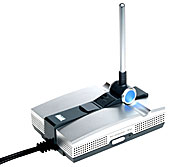
Wireless Expander

I received my new Linksys WRE54G Wireless Expander tonight. I'm still working on it and not sure if it's working yet. I was line-of-sight with it, with my laptop six feet away, but still the setup program would not find the expander.
The WRE54G operates over 'B' [IEEE802.11b] or 'G' [IEEE802.11g], I hope.
I purchased the range expander [repeater] because my Laptop just one room away would not see my wireless network router and desktop, which keeps me on my desktop more then I would like.
This week-ends project is to get the wireless printer server working [from the last post].
Tuesday, February 07, 2006
New Wireless Print Sever
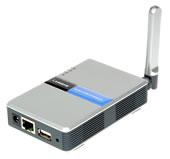
Wireless Print Server
I got a new wireless printer server for my printer tonight. The printer server is the WPS54G from Linksys. The server operates over 802.11g [2.4GHz] and connects to the printer over USB [or maybe Ethernet].
I tried to connect it up but the system never saw the printer server. Not a real surprise, as no wireless linksys device has worked the first time. ~ Or it could be that I had the pinter pluged in to the wrong port on the router.
So it's two days later and I still can't get the printer server to work. I've tried powering up the printer and server in differnet orders, changing the printer/router port. The printer still prints?
Monday, February 06, 2006
Un-interruptible Power Supply
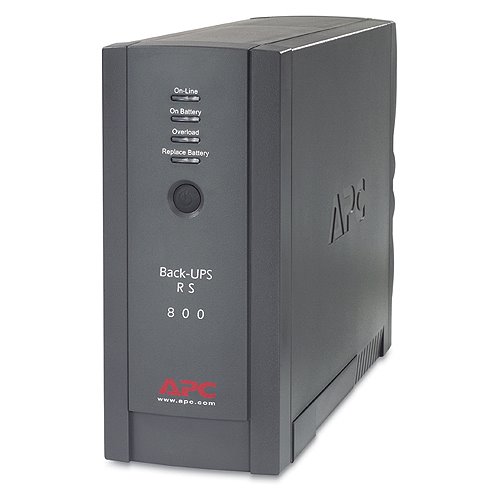
UPS
This is the UPS I used with my system. The UPS is produced by APC, and the model number is XS800-BLK. The UPS can support 540 watts / 800VA. The unit has 7 AC output connections, all AC outputs are NEMA 5-15R style connectors. Three of the outputs are surge protected only, while the other four have battery backup protection.
The unit also has two 10/100 Ethernet ports, and two phone ports which are protected.
The specification indicates a total backup time of 17 minutes at half load and 5 minutes at full load. I turn the system off with in a minute when I lose power for more then a brown-out.
The system has worked well for two years now. I'm thinking about up-grading.
Power Connector Manufacturers
Wednesday, February 01, 2006
Cost of running a Web Site
Web Site Cost
I ran some numbers last night trying to figure the amount of money it costs to run this web site.
I always have a fairly new computer, and these numbers include the cost of the Alienware PC I purchased in March of last year. However; all though I do try and get a high-end PC, I do not buy Gamer PC's ~ i.e. dual $400 video cards. I try and put the money into a higher speed processor instead.
Any how, the numbers indicate that I spent $3546.52 on computer related products last year [2005]. That number does not include the new Laptop computer I purchased last year because I have yet to find the receipt. So, over $4000 to type on a keyboard.
In fact if I had not up-graded my hosting contract the figure would be much greater. The cost to host the web site now, compared to early last year is reduced by a factor of 10 ~ as I was being fined each month for going over my bandwidth.
The Personal Computer data is here; interfacebus: Desk Top PC.
Of course the web site I run is http://www.interfacebus.com interfacebus
Tuesday, January 31, 2006
Web Site Hits comparison
In 1999 this web site received 32,100 visitors. That number was exceeded in just 8 days this year.
In 2000 this web site received 80,000 visitors. That number was exceeded after just 18 days this year.
In 2001 this web site received 131,300 visitors. That number was exceeded after just 31 days this year.
The year 2002 received 221,900 visitors. That number was exceeded after just 49 days this year.
The year 2003 received 249,164 visitors. That number was exceeded after just 55 days this year.
The web site referred to is http://www.interfacebus.com and not this blog address.
http://www.interfacebus.com/
Monday, January 23, 2006
Brother MFC-5840CN does not Scan
So I tried to scan a document the other night on my new printer/scanner. Well I could not get it to work ~ printing seems to work. I dumped my working [scanning] HP printer because I wanted a flat-bed scanner. So I kind of wanted the Brother MFC-5840 to scan my documents. Well, that's just not working yet.
I looked at the manual, and the scanning function is not mentioned [see the CD] ~ not a good sign. The Doc's refers me to the Paper-port software ~ also not a good sign. I already have a flat-bed Paper Port scanner. The reason I don't use the Paper Port flat-bed scanner is because Paper Port does not support it's own scanner after Windows 2000 [or so]. The flat bed scanner from Paper Port is junk.
I went out to the Brother web site. My issue is listed in the FAQ. I need to re-boot, and / or, re-loaded the software. Which I did..... [no help found]
Would I recommend the 5840, NO
Would I recommend the MFC-5840, NO
Would I recommend a Brother Printer, NO.
Friday, January 20, 2006
Lap-Top Computer up-grade
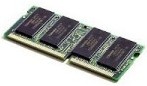
SODIMM
I added another 256MB memory stick to my lap-top tonight. That brings my memory to 512 Mega-Bytes, via two 256 Mega-byte SO DIMMs.
It took a while to get the SO-DIMM installed ~ I had to go out to Notebook for dummies to figure it out. So install at 45 degrees and push works.
The lap-top appears to work much faster now with twice the memory. The memory type is PC2100.
Wednesday, January 18, 2006
Digital Media Card reader
The Brother MFC-5840 Printer comes with a Digital Card Reader. The card reader contains three card slots for the following flash media [links are to interface descriptions]:
Compact Flash
SmartMedia
Memory Stick
x-D Picture Card
Secure Digital
While the main page which contains links to a number of different Flash Media types is located here
The three card slots accept a number of different flash cards. One card slot accepts a CF [Compact Flash] card [type I only]. One slot accepts either a x-D Picture Card or a SmartMedia card [3.3v only], while the final card slot takes either Memory Stick or Secure Digital cards. Using adaptors [not supplied] I can also use a miniSD and a Memory Stick Duo card.
I really do not have an application that uses any of these flash cards, but the option was provided on my PC for only $10, so I got the reader there and the printer.
So far, I would recommend the Brother MFC-5840CN multi-function printer. The printer is not shipped with an Ethernet or USB cable. The printer does ship with all four ink colors.
Tuesday, January 17, 2006
New Printer / Fax / Scanner

5840 Brother Printer
I purchased a new multi-function printer today to replace the outdated HP printer I now have.
The new printer is manufactured by Brother International Corporation, the model number is 5840. This is an inkjet printer, plus it will Fax, Print, Copy, Scan, PC Fax, and PhotoCapture what ever that is.
I wanted a flat-bed scanner which the HP BJC-600 did not have. I had to hope for the best on the rolled-head scanner using the HP printer. That printer also had a IEEE-1284 interface.
Any way, the major features other the printer include either a USB Bus and/or an Ethernet Bus interface, a RJ45 33.6k fax connection, and a Digital Media Card reader.
This is a black and White [B/W] or color machine. It also has two paper trays which the HP did not.
Saturday, January 14, 2006
More new pages
I added a few more pages today. The
ATCA Board Manufacturers page lists a dozen card manufacturers.
The ATCA Express Board Manufacturers page which does not yet have any manufactures, and the CompactPCI Express Board Manufacturers, also with no listed companies.
AdvancedTCA has been around for a few years, the other standards are newer.
There is another blog that I run that provides links to the new pages that are added to the web site: New Page Additions.
Wednesday, January 11, 2006
Two new page additions
I added two new pages tonight:
CompactTCA
MicroTCA
Both pages are just a copy of the cPCI page for tonight, but I should have time this week end to fix up the pages and add the correct information.
Monday, January 09, 2006
Serial SCSI
The Serial Attached SCSI [SAS] Bus defines Physical layer, PHY Layer, Link Layer, Port layer, and Application Layer. SAS may also just be called Serial SCSI. The Physical Layer consists of two sets of differential lines, one receive set and one transmit set [4-wire total]. The PHY Layer connects the differential Transmitter and Receiver circuits [ICs] to the Physical Layer, which defines the cable, connector, and transceiver [Transmitter / Receiver] characteristics. The external connector will accept 4 physical links, while the cable may hold between 1 and 4 physical links. Internal connectors are also defined. Two data rates are defined: 1.5Gbps and 3.0Gbps over a 100 ohm [+ 15 ohm] differential impedance cable. SAS uses the Serial ATA physical interface, including the connector receptacle and connector plugs.
SAS transmits data using 8B/10B at a maximum level of 1.2 volts [Tx voltage = 800-1600mV], [Rx voltage = 275-1600mV]. SAS uses big-endian, while SATA uses little-endian byte ordering. SAS uses a 32 bit CRC. Like SATA, SAS uses LVDS
Friday, January 06, 2006
SAS Roadmap
I had a look at the STA road map [SCSI Trade Association]. Here are the details;
Ultra 320 SCSI [2002 to 2009]
SAS 3 Gbps SCSI [2004 to 2011]
SAS 6 Gbps SCSI [2007 to 2012]
SAS 12 Gbps SCSI [2011 to 2014]
These dates are approximate. 'SAS' stands for Serial Attached SCSI
This page has a description of Serial SCSI;
http://www.interfacebus.com/Design_Connector_Serial_SCSI_Bus.html
And this page has a description of Parallel SCSI;
http://www.interfacebus.com/Design_Connector_SCSI.html
Both pages resides on:
http://www.interfacebus.com/
[Updated 1/30/2010] The most recent road map I've seen dates to 2009 and shows almost no SCSI drives projected to be sold by 2009, while this one indicated SCSI 320 in demand. I guess things changed a bit.
Thursday, January 05, 2006
Laptop Memory Up-grade
SODIMM
My Notebook computer [HP ze4805wm]contains one 256 MB SO-DIMM [200-pin]. The SO-DIMM style is PC2100. The clock speed of PC2100 is 266MHZ.
The part number for the memory module which was supplied with the laptop is; Hewlett Packard (HP) Laptop / Notebook Memory: 317435001 / 317435-001. I was never able to find the cas latency.
I discovered I have two SO-DIMM slots so the plan is to up-grade the system with another 256MB PC2100 SO-DIMM, giving me 512MB of system memory. This allows me to keep the orginal 256MB. Ranging around $30 to $70 per stick.
SO DIMM = Small Outline Dual In-Line Memory Module.
Wednesday, January 04, 2006
Wireless USB
I added a new page which will cover Wireless USB. The page is located at:
http://www.interfacebus.com/Wireless_USB.html
It's really still just a copy of the USB page, but that's what wireless USB is [with out a cable]. So I'll be fixing up that page over the coming days.
Tuesday, January 03, 2006
USB Flash Drive
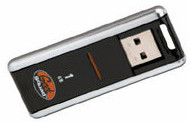
Flash
I got a new 1G Byte USB flash drive today.
I tried to back-up some data to my laptop yesterday and filled my other Flash drive. This new one even has pre-installed programs ~ like I have time to use them.
So now I have a:
32MB Buslink USB Flash drive
256MB Impact USB Flash drive
1GB Geek Squad USB Flash drive
Sunday, January 01, 2006
Serial Attached SCSI [SAS] Bus
The Serial Attached SCSI [SAS] Bus defines the Physical layer, PHY Layer, Link Layer, Port layer, and Application Layer. SAS may also just be called Serial SCSI. The Physical Layer consists of two sets of differential lines, one receive set and one transmit set [4-wire total]. The PHY Layer connects the differential Transmitter and Receiver circuits [ICs] to the Physical Layer, which defines the cable, connector, and transceiver [Transmitter / Receiver] characteristics.
The external connector will accept 4 physical links, while the cable may hold between 1 and 4 physical links. Internal connectors are also defined. Two data rates are defined: 1.5Gbps and 3.0Gbps over a 100 ohm [+ 15 ohm] differential impedance cable. SAS uses the Serial ATA physical interface, including the connector receptacle and connector plugs.
SAS transmits data using 8B/10B at a maximum level of 1.2 volts [Tx voltage = 800-1600mV], [Rx voltage = 275-1600mV]. SAS uses big-endian, while SATA uses little-endian byte ordering. SAS uses a 32 bit CRC. Like SATA, SAS uses LVDS
